
Cnuas Virtual AI HPC Infrastructure
Cnuas (pronounced Knoo-us, from the Irish Gaeilge word for "cluster") is a 100% software-emulated virtual AI and HPC infrastructure. It reproduces a full AI datacenter, switches, RDMA NICs, GPUs, and GPU fabric, entirely in software, so teams can teach and explore HPC, AI, and Networking (RDMA, RoCEv2, InfiniBand) without physical GPU clusters or InfiniBand switches.
Cnuas is built for Education and Research & Development, and lives at cnuas.io. It is developed under the internal Cnuas (High-performance Computing AI and Networking) engineering programme at Packet Five Networks.
Vertically open full-stack co-design
Physical AI and HPC testbeds provide real hardware and are indispensable for measuring timing, power and compatibility. Their installed accelerators are normally fixed vendor products, however: a testbed user can change applications and system software but generally cannot modify proprietary accelerator RTL, internal firmware, math blocks or fabric logic.
Cnuas provides a different research surface. The implementation is inspectable and modifiable from device and experimental RTL models through the ISA, compiler, kernels, drivers, runtime and communication libraries, and onward through the network, rack-management firmware and facility twin. A cross-layer experiment can therefore change both sides of an interface and validate the result on one workstation.
| Layer | Modifiable Cnuas surface | Starting point | Validation |
|---|---|---|---|
| Device and experimental RTL | QEMU device model, host device backend, functional FPGA RTL | CnuasGPU Design | make -C src/cnuasgpu check; FPGA make lint && make sim |
| ISA and compiler | CnuasIR objects, interpreter and CnuasCC | Software-stack guides | make -C src/cnuasgpu/tools check |
| Runtime and math | CnuasDev, CnuasRT, compute backends and CnuasBLAS | Host Character Device | make -C src/cnuasgpu/examples check |
| Collective and peer communication | CnuasCCL, peer memory and CnuasLink | CnuasLink Switch Design | make -C src/cnuasgpu check |
| Network and rack management | NIC, switch, OpenBMC, PSU and BBU firmware | OCP Rack Management | make evidence |
| Facility | OpenUSD campus, power and cooling model | Facility Twin Design | make evidence |
The FPGA path is experimental and in progress. Current evidence is functional RTL simulation of an eight-lane FP32 descriptor engine; it is not a timing-accurate FPGA result, and no released bitstream, timing closure, resource report or board validation is claimed.
Cnuas peer memory is also experimental and in progress. The CnuasGPU DMA-BUF
exporter, libcnuaspeermem, standard verbs registration, and CnuasNIC importer
are implemented, and the host ABI and ownership tests pass. Live allocation
lifetime and GPU-to-RDMA transfer validation remains gated on a guest exposing
both devices, so end-to-end operation is not yet claimed.
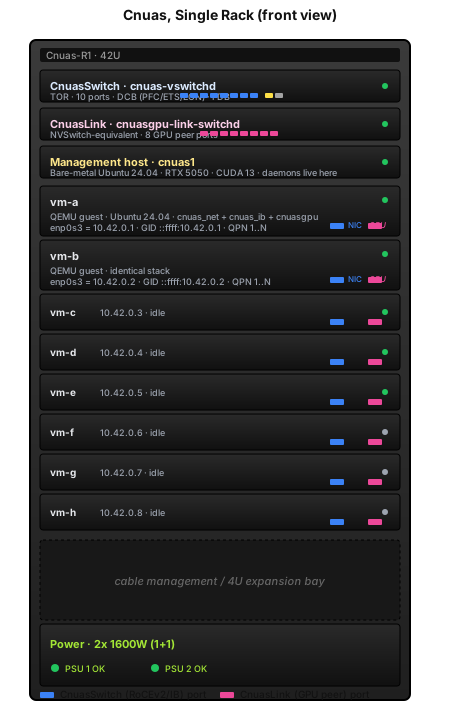
The reference deployment maps 1:1 to a real Open Compute Project Open Rack v3. Two 1OU top-of-rack switches (CnuasSwitch for the RoCE and InfiniBand fabric, CnuasLink for the GPU peer fabric), a management host running the daemons, and eight 2OU VM blades acting as GPU compute nodes. Every blade is a QEMU guest with a virtual CnuasNIC and CnuasGPU, and the whole rack runs on a single workstation.
See the System Topology for the two-rack view, the animated traffic-flow diagram, and the full component walk.
Drive the whole rack from one tool
cnuas is the unified control plane. One command surface drives the switch
fabric, the GPU fabric, GPUs, RDMA NICs, and VM lifecycle, and the same service
layer is exposed as a REST API for automation.
$ cnuas system health
┏━━━━━━━━━━━┳━━━━━━━━━━━┳━━━━━━━━━┓
┃ Component ┃ Available ┃ Detail  ┃
┡━━━━━━━━━━━╇━━━━━━━━━━━╇━━━━━━━━━┩
│ cnuasswitch  │ yes       │         │
│ cnuaslink    │ yes       │         │
│ cnuasgpu     │ yes       │         │
│ cnuasnic     │ yes       │         │
│ vm        │ yes       │         │
└───────────┴───────────┴─────────┘

$ cnuas switch set-mode 2 STRICT_IB
{ "status": "ok", "port": 2, "mode": "STRICT_IB" }

$ cnuas gpu list --json
[ { "gpu_id": 0, "sm_count": 32, "link_up": 1, "source": "ioctl" } ]

$ cnuas vm up vm-a --gpus 1
✓ vm-a is up  (ssh :2222, gpu 1, fabric /run/cnuas/port_0.sock)

$ cnuas api --host 0.0.0.0 --port 8080
# REST API live at http://0.0.0.0:8080  (Swagger UI at /docs)
Full command and endpoint reference is in Programmability (CLI & REST API), with an interactive Swagger UI and ReDoc API browser.
Documentation
| Document | Description |
|---|---|
| System Topology | End-to-end map of host daemons, QEMU devices, guest stack, and fabric walks |
| Virtual Switch Design | NIC fabric, RoCEv2 and InfiniBand, DCB (PFC/ETS/ECN) |
| CnuasLink Switch Design | GPU fabric, CnuasLink protocol, ivshmem fast-path |
| CnuasGPU Design | Virtual GPU, CnuasIR ISA, runtime, libraries, and tools |
| CnuasGPU Host Character Device | Host /dev/cnuasgpu_hostN, zero-copy, pinned memory, DMA-BUF sharing and asynchronous queues |
| Cnuas Peer Memory | DMA-BUF export of CnuasGPU memory and CnuasNIC RDMA registration |
| Custom Data Center Simulation | Beginner-to-Isaac workflow for custom sites, halls, racks, power, cooling, grid, and live telemetry |
| Driver & Userspace Design | Kernel drivers, libibverbs provider, RDMA stack |
| OCP Rack Management Design | OpenBMC, Redfish, and the ORV3 power shelf on RS-485 |
| Facility Twin Design | Procedural OpenUSD campus, TIA-942 rooms, and the campus power model |
| Calibrated Virtual Time | Deterministic cross-component timing, profiles, queueing, calibration, CLI and Python tools |
| Control Plane Reference | Management API, CLI commands, and Web UI REST API |
| Programmability (CLI & REST API) | The cnuas CLI and REST API for end-to-end control |
| Product Roadmap | Feature availability today versus planned, Epics, Tasks, GitHub Projects board |
| Validation Matrix | Which test proves which feature, and whether it passes |
Datasheets
Product-style datasheets summarise each emulated device's specifications on a single reference page.
| Datasheet | Description |
|---|---|
| Cnuas Platform | The full virtual AI and HPC infrastructure, switches, NICs, GPUs, host requirements |
| CnuasSwitch | 10-port virtual TOR RoCEv2 and InfiniBand switch with in-switch Subnet Manager |
| CnuasNIC | RoCEv2 and native InfiniBand RDMA virtual NIC |
| CnuasGPU | SIMT virtual GPU with CnuasIR ISA and CUDA-style runtime |
| CnuasLink | GPU-to-GPU fabric interconnect |
| Cnuas Software Stack | GPU runtime, compute backends, verbs provider, daemons, control plane, tooling |
| Cnuas Peer Memory | Experimental DMA-BUF export and CnuasNIC RDMA registration path |
| Calibrated Virtual Time | Deterministic event model, target calibration and held-out error reporting |
Components
| Component | Language | Description |
|---|---|---|
| cnuas-vswitchd | C (GNU C) | Soft TOR switch daemon, 10-port RoCEv2 and InfiniBand fabric, runs on the host with no guest |
| cnuasgpu-link-switchd | C (GNU C) | CnuasLink soft GPU fabric switch, runs on the host with no guest |
| CnuasGPU | C (GNU C) + LLVM | SIMT accelerator, usable as a Soft-GPU in a host process or as a QEMU PCIe device |
| libcnuaspeermem | C (GNU C) | Experimental CnuasGPU DMA-BUF export and CnuasNIC RDMA registration library |
| cnuas / cnuas-cli / cnuaslink-cli | Python | Unified and per-component management CLIs |
| cnuas-api | Python (FastAPI) | Unified REST API service for end-to-end control |
| cnuas-webui | Python + Next.js | Browser-based dashboard |
| RoCE-IB-vNIC | C (QEMU) | Custom PCIe virtual NIC |
| cnuas_net.ko / cnuas_ib.ko | C (kernel) | NIC and RDMA kernel drivers |
Quick Start
Prerequisites
- GCC (GNU C compiler)
- Make
- Python 3.10+ with
pytest
Build & Test (one command)
Step by step
# Build the switch daemon
cd src/cnuasswitch/switch && make

# Run the switch daemon
./build/cnuas-vswitchd --run-dir /var/run/cnuas --foreground

# Run endpoint tests (separate terminal)
cd ../..
python3 -m pytest tests/ -v