Datacentre Simulation
Cnuas models a hyperscale AI campus as one artefact, from the silicon up to the site. The rack that runs the workload is emulated in software, and the campus that would house it is generated as an OpenUSD stage that opens in NVIDIA Isaac Sim or any USD viewer.
The two halves are joined. Site electrical load is computed from the same racks the emulator runs, so a change in the compute load moves the number on the grid connection. Nothing here is driven by a synthetic trace.
New to Isaac Sim or data-center planning?
Start with Building a Custom AI/HPC Data Center Simulation. It explains Cnuas, OpenUSD, and Isaac Sim from first principles, then walks through site area, buildings, halls, racks, network rooms, cooling, power, grid sizing, validation, stage generation, Isaac Sim import, and live ORv3 telemetry. No Isaac Sim knowledge is assumed.
The film
A walk through the generated campus, the buildings, the data halls, and the two
racks that Cnuas actually emulates. Every rectangle in the film is drawn from
the output of plan.plan_campus(), so it is the same geometry the OpenUSD
exporter writes to the stage. (MP4, 2:14, with narration.)
The campus
The reference campus, default_campus(), is a 1,000 by 800 metre site holding
three datacentre buildings, sixteen data halls, 1,920 racks and a 291 MW
facility load.
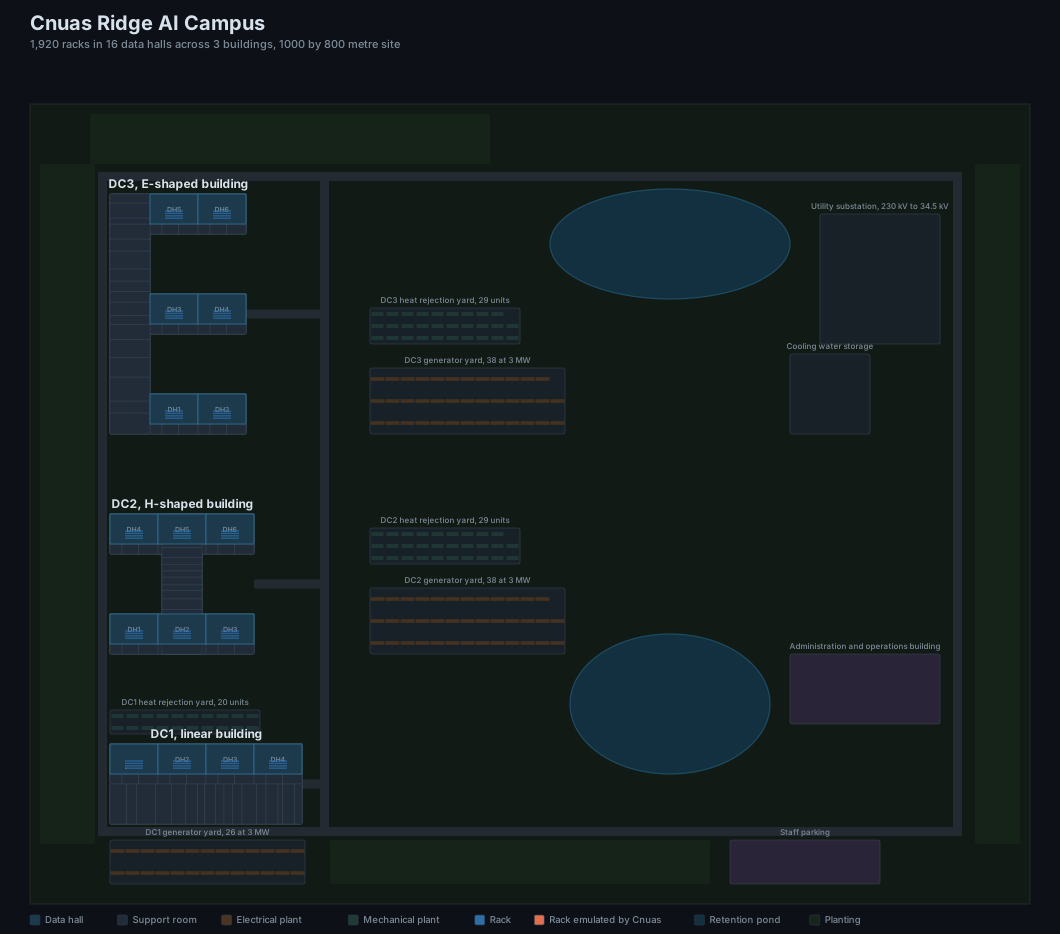
Every rectangle in that plan is read from the same planner the USD exporter consumes, so the drawing and the stage cannot disagree.
The building shapes are not styling. In an H or an E the central spine
carries the electrical and mechanical plant while the data halls occupy the
limbs, so every busway run and every pipe header stays short. The shape is the
distribution strategy made visible.
| Building | Shape | Data halls | Racks |
|---|---|---|---|
| DC1 | I, linear |
4 | 480 |
| DC2 | H |
6 | 720 |
| DC3 | E |
6 | 720 |
Buildings sit west of the north to south service spine. Plant yards, the utility substation, cooling water storage, the administration building and parking sit east of it, which keeps the route from the loading dock to any hall short and gives a fire appliance a way to every face of every building. Two retention ponds and four planted screening belts complete the site. The ponds are amenity, and they are also stormwater and thermal infrastructure, which is why real campuses have them.
Inside a data hall
Fifteen of the sixteen halls are emitted as named volumes carrying a rack count and a load. One hall, DH1 in DC1, is emitted rack by rack.
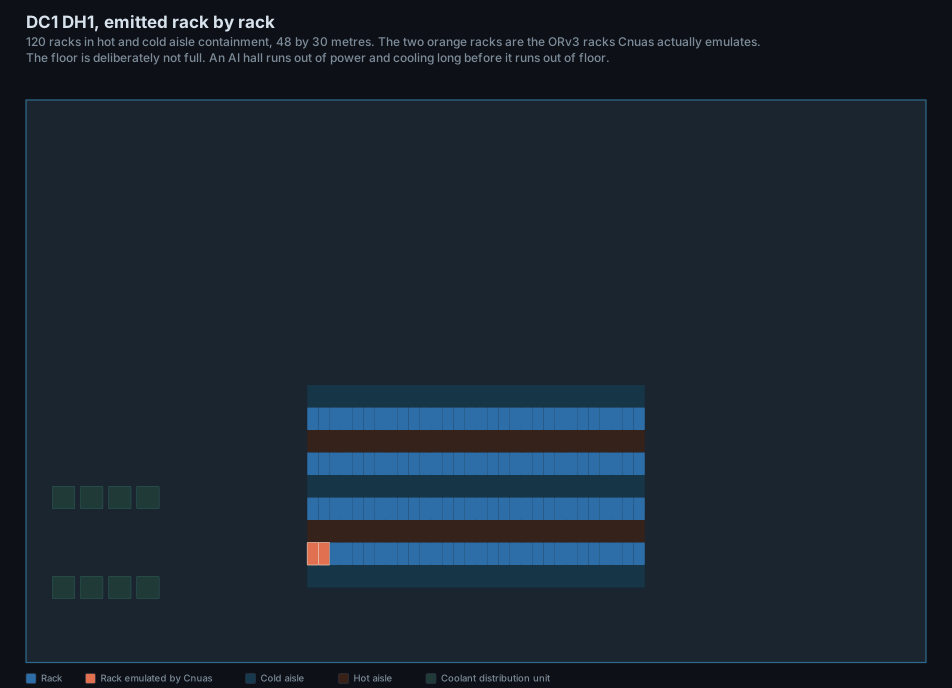
The two racks in orange are the ORv3 racks the emulator runs. They carry a telemetry attribute on the USD prim:
That address is a real power supply on the emulated ORV3 power shelf. Reading
PSU_Output_Voltage and PSU_Output_Current from it gives a measured wattage
that is written back onto cnuas:power:drawKw, which is how the campus is
driven by the emulator rather than by a spreadsheet.
The floor is not full. A liquid cooled AI hall runs out of power and cooling long before it runs out of floor, so the remaining area goes to coolant distribution and to the next phase.
The rack Cnuas emulates
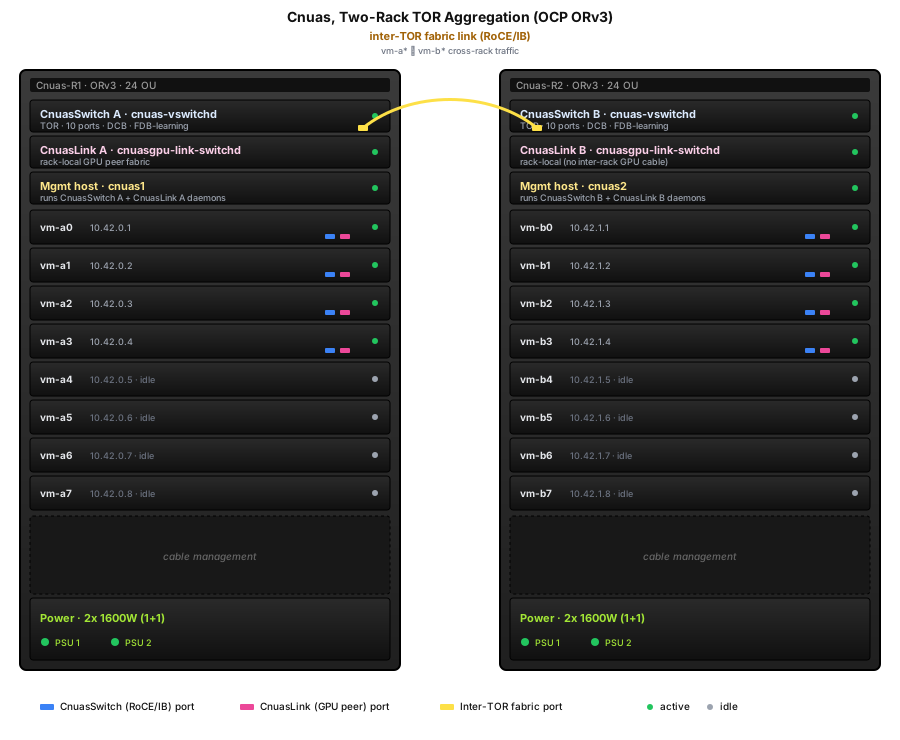
Two racks on the Open Compute Project Open Rack v3, each carrying two 1OU top of rack switches, a management host, and eight 2OU blades. Every blade is a guest with an emulated RDMA adapter and one or more emulated accelerators. The whole deployment runs on one workstation.
The numbers
The power roll up is computed, not quoted. Change the rack count or the rack type and every figure below moves, including the number of generators.
| Quantity | Value |
|---|---|
| Racks | 1,920 |
| IT load | 253.2 MW |
| Design PUE | 1.15 |
| Facility overhead | 38.0 MW |
| Grid connection | 291.2 MW |
| Heat to reject | 253.2 MW |
| White space | 23,040 m2 |
| Power density | 11.0 kW/m2 |
| Standby generators | 99 at 3 MW |
Each building carries the full TIA-942-B room programme, from the Entrance Room and Meet-Me Room through the Main Distribution Area to the data hall, with a Horizontal Distribution Area, coolant distribution room and fan wall gallery per hall, plus the medium voltage switchgear, transformer vault, paralleling switchgear, battery, pump and water treatment rooms that make a building run.
Reproduce the reference campus
The commands below reproduce the already-defined reference campus. They are not the starting point for a custom design. For a custom facility, first complete the beginner workflow, create a JSON specification, and validate its geometry and engineering values.
python3 -m venv .venv
source .venv/bin/activate
pip3 install -e './facility[test]'

cnuas-facility power                     # the power roll-up, no USD needed
cnuas-facility rooms                     # the room programme, per building
cnuas-facility build --out campus.usda   # the OpenUSD stage
For a custom campus:
cnuas-facility template --out my-campus.json
cnuas-facility validate --config my-campus.json
cnuas-facility rooms --config my-campus.json
cnuas-facility power --config my-campus.json --depth 2
cnuas-facility build --config my-campus.json --out my-campus.usda
Open campus.usda in NVIDIA Isaac Sim, usdview, Blender, or any other USD
capable tool. To drive the stage from the emulated power shelf:
The plans on this page are regenerated with:
Where to read further
- Facility Twin design, how the generator and the power model work
- Custom data-center simulation guide, the complete beginner-to-Isaac workflow
- Facility Twin datasheet, the part level specification
- OCP Rack Management design, the ORv3 power shelf the telemetry comes from
- System Topology, the emulated rack in detail